Help / Words
Fix transcript mistakes
Select the wrong words in the transcript and press Return. Type the right text and click Apply. The video stays the same and the word timings are kept.
Correct a word
- In the Words tab (⌘2), select the word or words that are wrong.
- Press ↩, or right-click and choose Correct text….
- Type the right text and click Apply.
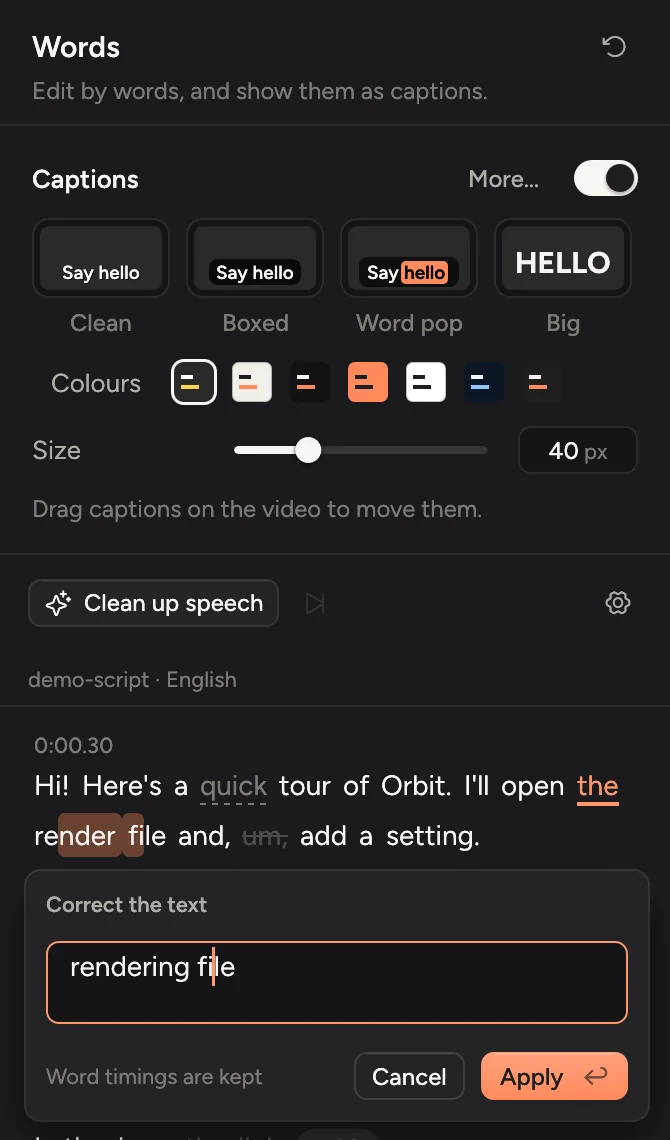
Only the text changes. The video, and when each word shows in the captions, stay the same.
Tip
If a name or product is wrong everywhere, add it to Key terms in the transcription settings and transcribe again. See Better results.
Paragraphs
Put the cursor before a word and press ⇧↩ to start a new paragraph there, or to join it with the one before. Paragraphs make a long transcript easier to read.
Words marked as unsure
Words the recogniser wasn't sure about are marked as low confidence. Check those first.
Updated 22 October 2026Something unclear? Tell us